



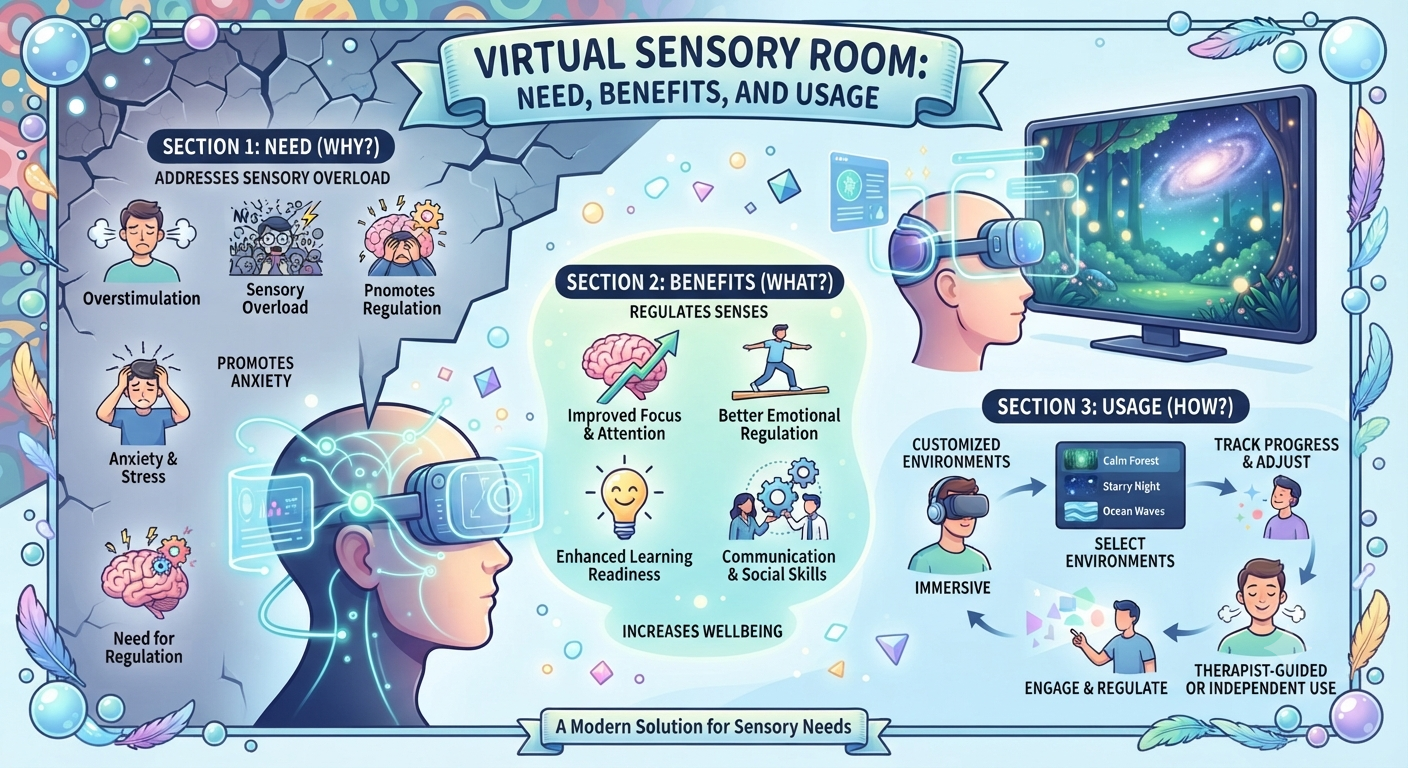
What is a Virtual Sensory Room?
A virtual sensory room is a digital environment that provides calming visual effects, ambient sounds, and interactive sensory tools through computer screens, tablets, or VR headsets. Unlike physical sensory rooms, virtual sensory rooms offer accessible, cost-effective sensory regulation support for individuals with autism, sensory processing difficulties, anxiety, or ADHD-without requiring dedicated physical space or expensive equipment.
📋 Table of Contents
Virtual sensory rooms are revolutionizing how we support individuals with sensory processing needs. As technology advances and accessibility becomes crucial, these digital environments offer a practical alternative to traditional physical sensory rooms-providing similar benefits at a fraction of the cost and space requirements.
This comprehensive guide explores everything you need to know about virtual sensory rooms: what they are, why they’re needed, research-proven benefits, who can use them, available digital tools, and practical strategies for implementation at home, school, or clinical settings.
💡 Quick Fact:Research shows that virtual sensory rooms can reduce anxiety, depression, and improve sensory processing scores in individuals with disabilities-making them a promising tool for emotional regulation and wellbeing.
What is a Virtual Sensory Room?
A virtual sensory room (also called a digital sensory room or VR sensory room) is an interactive digital environment designed to provide sensory stimulation and regulation through visual effects, sounds, and sometimes tactile feedback via screens or virtual reality headsets.
Key Components of Virtual Sensory Rooms
- Visual Effects: Calming animations like lava lamps, aurora borealis, floating particles, rain drops, bubbles, or abstract patterns
- Ambient Sounds: White noise, nature sounds (rain, ocean waves, forest), soft music, or binaural beats
- Interactive Elements: Clickable objects, draggable items, responsive animations that react to user input
- Customization Options: Adjustable colors, speeds, volumes, and effect combinations to match individual preferences
- Accessibility: Available on computers, tablets, smartphones, or VR headsets-no dedicated room required
How Virtual Sensory Rooms Differ from Physical Sensory Rooms
Traditional physical sensory rooms are dedicated spaces equipped with bubble tubes, fiber-optic lights, tactile panels, soft seating, weighted blankets, and aroma diffusers. While effective, they require:
- Significant physical space (entire room or large area)
- High cost (equipment can range from hundreds to thousands of dollars)
- Maintenance and safety considerations
- Limited accessibility (only available where physically located)
In contrast, virtual sensory rooms provide similar sensory experiences through digital means, making them:
- Accessible from anywhere with a device
- Cost-effective (many free or low-cost options)
- Easy to customize and update
- Portable and scalable
✅ Key Advantage:Virtual sensory rooms eliminate geographical and financial barriers, making sensory regulation tools accessible to families, schools, and individuals who cannot afford or access physical sensory spaces.
Why Virtual Sensory Rooms Are Needed
The need for virtual sensory rooms has grown significantly due to several factors:
1. Increasing Prevalence of Sensory Processing Challenges
- Autism spectrum disorder affects approximately 1 in 36 children (CDC, 2023)
- Sensory processing disorder impacts 5-16% of school-aged children
- ADHD, anxiety, and other conditions often co-occur with sensory difficulties
- Growing awareness and diagnosis rates increase demand for support tools
2. Limited Access to Physical Sensory Rooms
- Most schools lack dedicated sensory spaces due to budget or space constraints
- Families cannot afford home sensory room setups (cost: $500-$5,000+)
- Rural or underserved areas have limited access to therapy centers
- Waitlists for occupational therapy can be months or years long
3. Need for Immediate, On-Demand Support
- Sensory dysregulation can happen anytime, anywhere
- Physical sensory rooms are location-bound
- Virtual tools provide instant access via smartphone or tablet
- Can be used during transitions, travel, or unexpected stressful situations
4. Technology Integration in Daily Life
- Children and adults are increasingly comfortable with digital interfaces
- Screens are ubiquitous in homes, schools, and public spaces
- VR and AR technologies are becoming mainstream and affordable
- Digital natives prefer interactive, technology-based solutions
5. Post-Pandemic Shift to Digital Solutions
- Remote learning and teletherapy became normalized
- Families seek digital tools that complement in-person support
- Hybrid approaches (digital + physical) show best outcomes
- Virtual sensory rooms bridge gap between clinic and home
📊 Impact Statistics
Improvement in time to calm from challenging behaviors (from 4 minutes to 17 seconds)
Decrease in time to return to structured activities
Observer-rated improvement in emotional state
Research-Proven Benefits of Virtual Sensory Rooms
Emerging research demonstrates that virtual sensory rooms provide significant benefits across multiple domains:
Emotional and Behavioral Benefits
- Reduced Anxiety: Studies show significant decreases in anxiety levels after VR sensory room use, particularly in individuals with autism and intellectual disabilities
- Decreased Emotional Lability: Improved emotional stability and reduced mood swings
- Faster De-escalation: One study found 93% improvement in time to calm from challenging behaviors (dropping from average 4 minutes to just 17 seconds)
- Reduced Depression: Pre-post data indicated reductions in depression scores among adult users
- Improved Self-Regulation: Over 50% of children self-reported feeling better regulated after using virtual sensory experiences
Sensory Processing Benefits
- Improved Sensory Profiles: Significant improvements in sensory processing scores, particularly in sensory sensitivity and sensory seeking behaviors
- Reduced Sensory Hypersensitivity: Decreased over-responsiveness to sensory input
- Better Sensory Integration: Enhanced ability to process and respond to multiple sensory inputs simultaneously
- Increased Sensory Awareness: Improved recognition of personal sensory needs and preferences
Cognitive and Academic Benefits
- Enhanced Focus and Attention: Improved concentration during and after sensory room use
- Faster Transition to Learning: 63% decrease in time to return to structured academic activities
- Improved Classroom Engagement: Better participation and on-task behavior following sensory regulation
- Reduced Disruptive Behaviors: Fewer interruptions and behavioral incidents in educational settings
Social and Functional Benefits
- Improved Social Interaction: Better peer interactions and social engagement following regulation
- Increased Workplace Confidence: Adults report greater confidence in professional settings after using VR sensory interventions
- Enhanced Decision-Making: Improved ability to make choices and solve problems when regulated
- Greater Independence: Individuals learn to self-identify need for sensory breaks and use tools independently
Accessibility and Practical Benefits
- Cost-Effective: Many virtual sensory rooms are free or low-cost ($0-$50/month) compared to physical rooms ($500-$5,000+)
- No Space Requirements: Can be accessed from any device-no dedicated room needed
- Portable: Available on smartphones, tablets, laptops-use at home, school, travel, or therapy
- Customizable: Easy to adjust colors, sounds, speeds, and effects to individual preferences
- Hygienic: No physical contact with shared equipment (important post-pandemic)
- Scalable: Can serve unlimited users simultaneously without additional cost
📚 Research Evidence:A 2026 systematic review of 13 studies found that VR interventions targeting sensory regulation showed short-term benefits, particularly in reducing anxiety, emotional lability, and sensory hypersensitivity. Interventions with structured repetition, personalization, and immersive exposure showed the most promising outcomes.
Who Can Benefit from Virtual Sensory Rooms?
Virtual sensory rooms are designed to support a wide range of individuals across different ages and conditions:
Primary Beneficiaries
- Autism Spectrum Disorder (ASD): Individuals with autism often experience sensory processing differences and benefit from controlled, calming sensory input
- Sensory Processing Disorder (SPD): Those who struggle to process and respond to sensory information appropriately
- Attention Deficit Hyperactivity Disorder (ADHD): Individuals who need help with focus, impulse control, and emotional regulation
- Anxiety Disorders: People experiencing anxiety, panic attacks, or stress-related symptoms
- Intellectual Disabilities: Individuals with cognitive impairments who benefit from simplified, accessible sensory tools
Secondary Beneficiaries
- Depression: Research shows reductions in depression scores among adult users
- PTSD and Trauma: Calming sensory environments can support trauma-informed care
- Learning Disabilities: Students who struggle with focus or sensory overload in classrooms
- Behavioral Challenges: Individuals with explosive behaviors, aggression, or self-injury
- Neurotypical Individuals: Anyone experiencing stress, overwhelm, or needing a mental break
Age Groups
- Young Children (Ages 3-7): Simple, colorful visuals and interactive elements
- School-Age Children (Ages 8-12): More complex interactions and customization options
- Teenagers (Ages 13-18): Age-appropriate content, portable access via smartphones
- Adults: Professional settings, stress management, mental health support
- Seniors: Dementia care, relaxation, cognitive stimulation
Settings Where Virtual Sensory Rooms Are Used
- Homes: Daily regulation, bedtime routines, homework support
- Schools: Classrooms, resource rooms, counseling offices, libraries
- Clinics: Occupational therapy, speech therapy, mental health settings
- Hospitals: Pre-procedure calming, pain management, waiting areas
- Workplaces: Break rooms, stress management, employee wellness
- Community Centers: Libraries, recreation centers, support groups
⚠️ Important Consideration:While virtual sensory rooms benefit many individuals, they’re not suitable for everyone. Some people with severe photosensitivity, certain types of epilepsy, or strong preferences for tactile input may need alternative approaches. Always consider individual needs and preferences.
Types of Virtual Sensory Tools and Digital Resources
Various types of virtual sensory room tools are available, ranging from simple websites to advanced VR applications:
1. Web-Based Virtual Sensory Rooms
- Description: Browser-based platforms accessible via computer, tablet, or smartphone
- Features: Visual effects (lava lamp, aurora, particles), ambient sounds, simple interactions
- Examples: Tembrica Virtual Sensory Room, Penn State LibWell Virtual Sensory Room
- Cost: Often free or low-cost subscription ($0-$10/month)
- Best For: Quick access, schools with limited budgets, home use
2. Mobile Apps for Sensory Regulation
- Description: Downloadable apps for iOS and Android devices
- Features: Interactive fidgets, breathing exercises, visual timers, calming games
- Examples: Calm, Headspace, Breathe, Think, Do, Sensory Cinema
- Cost: Free to $50 one-time or $5-$15/month subscription
- Best For: Portability, on-the-go regulation, personal devices
3. Virtual Reality (VR) Sensory Rooms
- Description: Immersive 3D environments accessed via VR headsets (Oculus, HTC Vive, etc.)
- Features: Fully immersive 360° environments, interactive objects, spatial audio, haptic feedback
- Examples: Custom VR sensory room applications, therapeutic VR programs
- Cost: VR headset ($300-$800) + software ($50-$200 or subscription)
- Best For: Maximum immersion, clinical settings, research applications
4. Interactive Projection Systems
- Description: Projectors that create interactive sensory environments on walls or floors
- Features: Motion-reactive projections, interactive games, customizable content
- Examples: Starship, OmniVista, interactive floor projectors
- Cost: $500-$5,000+ depending on system
- Best For: Schools, clinics, larger spaces wanting physical interaction
5. Digital Calming Corner Platforms
- Description: Comprehensive platforms combining multiple sensory tools
- Features: Visual effects, breathing guides, emotion check-ins, progress tracking
- Examples: GoNoodle, Calm Counter, Breathing Zone
- Cost: Free to $100/year for school licenses
- Best For: Classrooms, group settings, structured implementation
Comparison of Virtual Sensory Room Tools
- Any device with browser
| Type | Accessibility | Cost Range | Immersion Level | Best Setting |
|---|---|---|---|---|
| Web-Based | Free – $10/month | Low to Moderate | Home, School, Quick access | |
| Mobile Apps | iOS/Android devices | Free – $15/month | Moderate | On-the-go, Personal use |
| VR Headsets | VR headset required | $350 – $1,000+ | High (Immersive) | Clinics, Research, Home |
| Interactive Projection | Requires projector + space | $500 – $5,000+ | Moderate to High | Schools, Clinics, Large spaces |
| Digital Platforms | Multiple devices | Free – $100/year | Moderate | Classrooms, Groups |
How to Use Virtual Sensory Rooms Effectively
Maximizing the benefits of virtual sensory rooms requires thoughtful implementation and individualized approaches:
Step-by-Step Guide for First-Time Use
- Choose the Right Platform: Select a virtual sensory room that matches the individual’s age, preferences, and sensory needs (visual, auditory, or both)
- Set Up the Environment: Minimize external distractions-quiet room, comfortable seating, appropriate screen distance (arm’s length for tablets, 2-3 feet for computers)
- Introduce Gradually: Start with 5-10 minute sessions to assess tolerance and interest
- Allow Free Exploration: Let the individual choose which effects to interact with-avoid forcing specific activities
- Observe Responses: Watch for signs of relaxation (slower breathing, reduced movement, softer facial expression) or overstimulation (increased agitation, looking away, covering eyes)
- Adjust Settings: Modify brightness, volume, speed, or type of effects based on individual preferences
- Establish Routine: Use at consistent times (after school, before homework, during transitions) to build predictability
- Combine with Regulation Strategies: Pair with deep breathing, progressive muscle relaxation, or mindfulness for enhanced effect
- Monitor Progress: Track changes in behavior, mood, and regulation over time to assess effectiveness
- Gradually Increase Independence: Teach the individual to recognize when they need a sensory break and access the virtual room independently
Best Practices for Different Settings
At Home:
- Use during transition times (after school, before bedtime)
- Create a cozy corner with comfortable seating and device stand
- Set clear expectations: “10 minutes of sensory time, then homework”
- Use as part of calming bedtime routine
- Keep device charged and easily accessible for emergencies
At School:
- Integrate into IEP or 504 plan as a sensory accommodation
- Designate specific times or use as needed with teacher permission
- Train staff on when and how to suggest virtual sensory breaks
- Use in resource room, counseling office, or classroom calm-down corner
- Document usage and behavioral changes for progress monitoring
In Clinical Settings:
- Incorporate into occupational therapy or counseling sessions
- Use as warm-up activity or cool-down after challenging tasks
- Combine with other therapeutic interventions (CBT, social skills training)
- Track physiological measures (heart rate, breathing) if available
- Teach caregivers how to continue use at home for consistency
Tips for Maximizing Effectiveness
- Personalize: Not all effects work for everyone-experiment to find preferences
- Timing Matters: Use proactively before dysregulation escalates, not just as reaction
- Limit Duration: 10-20 minutes is typically sufficient; longer isn’t always better
- Avoid Overuse: Virtual sensory rooms are tools, not replacements for other interventions
- Combine with Movement: Follow virtual sensory time with physical activity for balanced regulation
- Teach Self-Advocacy: Help individuals communicate: “I need a sensory break”
⚠️ Safety Precautions:
- Monitor for signs of overstimulation (increased agitation, covering eyes, looking away)
- Limit screen time according to age guidelines (AAP: 1 hour/day for ages 2-5, consistent limits for older)
- Ensure proper posture and screen distance to prevent eye strain
- Take breaks every 20-30 minutes if using for extended periods
- Consult with occupational therapist if unsure about appropriateness
Creating Virtual Sensory Spaces at Home
Setting up a virtual sensory room experience at home doesn’t require expensive equipment or dedicated space. Here’s how to create an effective setup:
Essential Components
- Device: Tablet, laptop, or smartphone with good screen quality
- Comfortable Seating: Bean bag, floor cushions, or cozy chair
- Headphones (Optional): For immersive audio without disturbing others
- Dim Lighting: Reduce overhead lights, use lamps or natural light
- Minimal Distractions: Quiet area away from TV, siblings, or high-traffic zones
Free and Low-Cost Virtual Sensory Room Resources
- Tembrica Virtual Sensory Room: Free online platform with lava lamp, aurora, particles, rain effects
- Penn State LibWell: Free virtual sensory room with fidgets, visual stim videos, white noise
- YouTube Sensory Videos: Search “sensory room,” “calming visuals,” “lava lamp” (supervise for ads)
- Calm App: Free version includes breathing exercises and nature scenes
- GoNoodle: Free for families, includes calming activities
DIY Virtual Sensory Corner Setup
- Choose a Location: Corner of bedroom, living room, or even a closet
- Add Comfort: Soft pillows, weighted blanket, or comfortable chair
- Set Up Device: Tablet stand or laptop at comfortable viewing height
- Control Lighting: Dimmable lamp or string lights (avoid harsh overhead lights)
- Reduce Noise: Close door, use white noise machine or fan if needed
- Create Visual Boundaries: Use room divider, canopy, or bookshelf to define space
- Add Personal Touches: Favorite stuffed animal, family photos, or calming colors
- Establish Rules: When to use, how long, what behaviors are expected
Sample Daily Schedule Using Virtual Sensory Room
| Time | Activity | Purpose |
|---|---|---|
| Morning (Before School) | 5 minutes calming visuals | Reduce morning anxiety, prepare for transitions |
| After School | 10-15 minutes virtual sensory break | Decompress from school day, regulate before homework |
| Before Homework | 5 minutes focusing activity | Improve attention and readiness for tasks |
| During Homework (as needed) | 3-5 minute reset break | Prevent frustration, maintain focus |
| Before Bed | 10 minutes calming visuals + breathing | Wind down, improve sleep readiness |
📚 Related Resources on limitlesslearner.in
🔗 Trusted External Resources:
Frequently Asked Questions (FAQ)
A virtual sensory room is a digital environment that provides calming visual effects, ambient sounds, and interactive sensory tools through screens or VR headsets. It offers sensory regulation support for individuals with autism, sensory processing difficulties, anxiety, or ADHD without requiring physical space or expensive equipment.
Virtual sensory rooms provide benefits including reduced anxiety and emotional lability, improved sensory processing, decreased time to calm from challenging behaviors (up to 93% improvement), better emotional regulation, enhanced focus and attention, and accessibility from any device. They’re cost-effective compared to physical sensory rooms and can be used anywhere.
Virtual sensory rooms benefit individuals with autism spectrum disorder, sensory processing disorder, anxiety, ADHD, depression, intellectual disabilities, and anyone experiencing sensory overload or stress. They’re suitable for children, teens, and adults across various settings including home, school, clinics, and workplaces.
Use virtual sensory rooms by selecting appropriate visual effects (lava lamp, aurora, particles), adjusting volume for ambient sounds, allowing free exploration and interaction, using during transitions or dysregulation, limiting sessions to 10-20 minutes initially, and combining with deep breathing or relaxation techniques for best results. Start with short sessions and gradually increase as tolerated.
Research suggests that virtual sensory rooms can be similarly effective for certain goals (anxiety reduction, emotional regulation) while offering advantages in accessibility and cost. Physical sensory rooms provide tactile and proprioceptive input that virtual versions cannot replicate. Many experts recommend a hybrid approach-using both virtual and physical tools based on individual needs and available resources.
Virtual sensory rooms range from free (web-based platforms like Tembrica, Penn State LibWell) to $10-$15/month for premium apps, or $350-$1,000+ for VR headset setups. This is significantly more affordable than physical sensory rooms, which can cost $500-$5,000+ for equipment alone. Many schools and families find virtual options more budget-friendly and accessible.
Yes, virtual sensory rooms are increasingly used in schools as part of sensory accommodations in IEPs or 504 plans. They can be accessed via classroom computers, tablets, or in counseling offices. Benefits include no space requirements, easy supervision, and ability to serve multiple students. Schools should establish clear guidelines for when and how students can access virtual sensory breaks.
🎯 Final Takeaway:Virtual sensory rooms represent an accessible, cost-effective, and research-supported tool for sensory regulation and emotional wellbeing. While they don’t replace all benefits of physical sensory spaces, they offer unique advantages in portability, customization, and scalability. Whether you’re a parent, educator, or therapist, incorporating virtual sensory tools into your support toolkit can provide immediate, on-demand regulation support for individuals with sensory processing needs.
[…] is a structured list of 20 sensory activities that can be used in a Virtual Sensory Room. These activities support children with sensory regulation needs, including those with Autism […]